 Formsy
Additional Place of Business in GST Online
Scale your GST registration by adding Additional Places of Business effortlessly. Register warehouses, branch offices, and e-commerce storage locations for seamless Amazon and Flipkart operations with end-to-end support from Formsy.
- GST Portal Amendment Filing
- E-Commerce Fulfillment Center APOB
- Fast-Track APOB for Amazon FBA, Flipkart, Warehouses
- Expand your business legally across all Indian cities
- End-to-End APOB Registration Support
Enter your details to receive a full quote and consultation

What is APOB Registration?
Additional Place of Business (APOB) Registration is the mandatory process of declaring and registering any business location other than the Principal Place of Business (PPOB) where a GST-registered taxpayer conducts business activities related to the supply of taxable goods or services.
Under GST law, an APOB refers to any secondary location—including warehouses, godowns, branch offices, factories, manufacturing units, distribution centers, storage facilities, or fulfillment centers—where a registered person carries out business operations such as storing inventory, manufacturing products, distributing goods, or providing services within the same state as the principal place of business.
The Principal Place of Business serves as the primary operational hub where core business management, administration, accounting records, and books of accounts are maintained, while Additional Places of Business represent all other operational locations under the same legal entity and GSTIN within that state.
APOB registration requires businesses to declare each additional location during initial GST registration or through subsequent amendment of registration by filing core field amendments on the GST portal, ensuring compliance with GST regulations across all business premises. This registration is crucial for maintaining transparent tax operations, claiming input tax credit accurately from multiple locations, and avoiding penalties for non-compliance under GST law.
PPOB vs APOB
| Basis | PPOB (Principal Place of Business) | APOB (Additional Place of Business) |
|---|---|---|
| Definition | The primary operational location where core business activities, central administration, and management decisions occur. The main address where books of accounts and business records are maintained. |
Any secondary location other than PPOB where business activities are conducted, such as warehouses, branch offices, godowns, factories, or distribution centers. |
| Registration Requirement |
Mandatory to declare during initial GST registration as the primary business address in Form GST REG-01. Only one PPOB per GSTIN in each state. |
Mandatory to register all additional locations within the same state under the same GSTIN. Can register up to 500 APOBs per GSTIN. |
| Key Activities Conducted |
Central administration, accounting and bookkeeping, management decisions, top-level operations, headquarters functions, strategic planning, and primary business operations. |
Inventory storage, warehousing, goods distribution, branch operations, manufacturing activities, regional sales offices, e-commerce fulfillment operations. |
| Documentation Required |
Ownership documents or lease agreement, property tax receipts, utility bills in business name, detailed business information, authorized signatory details, PAN and Aadhaar of promoters/directors. |
Address proof of additional location, rent/lease agreement with NOC from landlord (if rented), consent letter from property owner, utility bills, nature of business activities at that location. |
| Impact on Operations |
Serves as the central hub coordinating all business activities, primary contact point for tax authorities and legal matters, main billing and invoicing location. |
Enhances inventory management, reduces delivery times, improves regional logistics, enables multi-location operations, facilitates faster order fulfillment for e-commerce platforms like Amazon and Flipkart. |
| GST Compliance | GST returns filed from PPOB covering all transactions across PPOB and APOBs within the same state under one consolidated GSTIN. Main address for all official GST correspondence. |
Separate transaction records must be maintained for each APOB, though returns are filed consolidated. E-way bills can be generated from registered APOB addresses. Input tax credit claimed on purchases at each APOB location. |
Benefits of Additional Place of Business in GST
As your business expands to multiple operational locations—such as new branch offices, warehouses, distribution centers, or retail outlets—updating this information in your GST registration becomes essential for legal compliance and operational efficiency.
- Ensures Legal Compliance and Transparency: Operating from several business locations necessitates the registration of each establishment under GST laws. APOB registration assures complete compliance with GST law and protects against potential penalties, fines, and legal implications from tax authorities. When all business locations are correctly registered, GST authorities can reliably track your business activity across several locations, lowering audit risks and ensuring transparent tax operations.
- Streamlines Daily Business Operations: APOB registration allows for the smooth movement of goods and inventory between registered sites, with no legal problems or compliance issues. This helps to ensure smooth day-to-day operations by simplifying logistics, enhancing stock management across various sites, and eliminating inventory imbalances such as stockouts at one location while another has an excess supply. Registered sites can submit GST returns, keep records, and pay taxes individually for each site, making tax-related tasks easier to manage.
- Optimizes Logistics and Inventory Management: Officially registered warehouses, godowns, and storage facilities enable enterprises to strategically store inventories near client locations. This reduces delivery times, lowers transportation costs, and increases overall supply chain efficiency. Better inventory distribution among registered sites improves restocking planning, demand forecasting, and order fulfillment capabilities, resulting in higher customer satisfaction.
- Enhances Sales, Marketing and Customer Service: Establishing registered business premises in several cities, regions, or states allows enterprises to broaden their geographical reach and connect with a diversified consumer base. Local presence enables organizations to create region-specific marketing strategies based on local tastes and market realities. Proximity to clients through recorded locations improves delivery time, strengthens customer connections, boosts brand trust, and improves after-sales support services.
- Facilitates Business Expansion and Scaling: APOB registration is required for enterprises aiming to expand into new markets or territories. It legally authorizes operations from numerous locations, allowing enterprises to handle rising sales volumes, production capacity, or storage needs across multiple sites. This lays a solid platform for long-term business growth, encourages access into unexplored areas, and opens up new revenue sources while being fully GST compliant.
- Provides Tax Benefits and Financial Advantages: APOB registration enables businesses to reclaim Input Tax Credit (ITC) on the GST incurred for goods and services acquired at each registered site. This substantially lowers the overall tax burden by allowing businesses to counterbalance output GST with input credits from all active locations. Keeping accurate registration for every site streamlines the GST return submission process, guarantees precise tax assessments across various premises, enhances financial documentation, and helps avoid penalties or interest for failing to comply.
Eligibility for Registration of Additional Place of Business
Any business that operates from more than one location (apart from its main office or shop) in the same state needs to add those places as APOB under GST.
- Businesses with Warehouses or Godowns: If you store goods in a separate warehouse or godown other than your main location, you must register that place as an APOB.
- Businesses with Multiple Branches or Shops: If you run more than one shop, office, or branch in the same state, each of them must be added as an APOB under your GSTIN.
- Online Sellers Using Third-Party Warehouses (like Amazon or Flipkart): If you're selling through platforms like Amazon or Flipkart and storing your products in their warehouses, you need to add those warehouse addresses as APOBs.
- Manufacturers with Separate Production Units: If your factory or production unit is located away from your main office, it must be registered as an APOB.
- Service Providers Working from Multiple Offices: If you offer services from more than one office in the same state, each location should be listed as an APOB.
Documents Required for Additional Place of Business in GST
To add a new business location under GST, you need to submit proper documents that prove your right to use the place, whether it’s owned, rented, or shared.
Proof of Address for Your New Business Location
When you add a new place under GST, you must give proper documents to show that you are using that place legally. These documents depend on whether the place is owned, rented, shared, or based on the type of business you have.
Below are the different types of address proofs you can use.
1. Documents for Owned Premises
If you own the property, you need to submit any one of the following:
- Property Tax Receipt
- Electricity Bill (not older than 3 months)
- Municipal Khata Copy
- Ownership Deed or Sale Deed
2. Documents for Rented or Leased Premises
If you're using a rented or leased space, provide:
- Rent Agreement or Lease Agreement (not older than 11 months if unregistered)
- NOC (No Objection Certificate) from the property owner (if required)
- Latest Utility Bill (Electricity, Water, etc.)
3. Documents for Consent-Based or Shared Premises
If you're using space in someone else’s property without rent:
- Consent Letter from the property owner
- NOC (optional but recommended)
- Supporting Document: Like the owner’s property tax receipt or electricity bill
4. Documents for Proprietorship Company
- Owner’s Aadhaar Card and PAN Card
- Address Proof of the additional place (based on the type—owned/rented/shared)
5. Documents for Partnership Company
- Partnership Deed
- PAN Card of the firm
- Address proof of the additional place
- Authorization Letter (if signed by a partner on behalf of the firm)
6. Documents for Private Limited Company
- Certificate of Incorporation
- PAN Card of the company
- Board Resolution or Authorization Letter
- Address proof of the new business place
- Director’s ID and address proof
Note: Board Resolution is not mandatory for DSC-based filing if the authorized signatory is a director whose name is already registered on the GST portal.
How to Add “Additional Place of Business” on the GST Portal?
If your business is expanding to a new location, you need to update your GST registration by adding the additional place of business on the GST portal. This ensures proper compliance and avoids any legal issues.
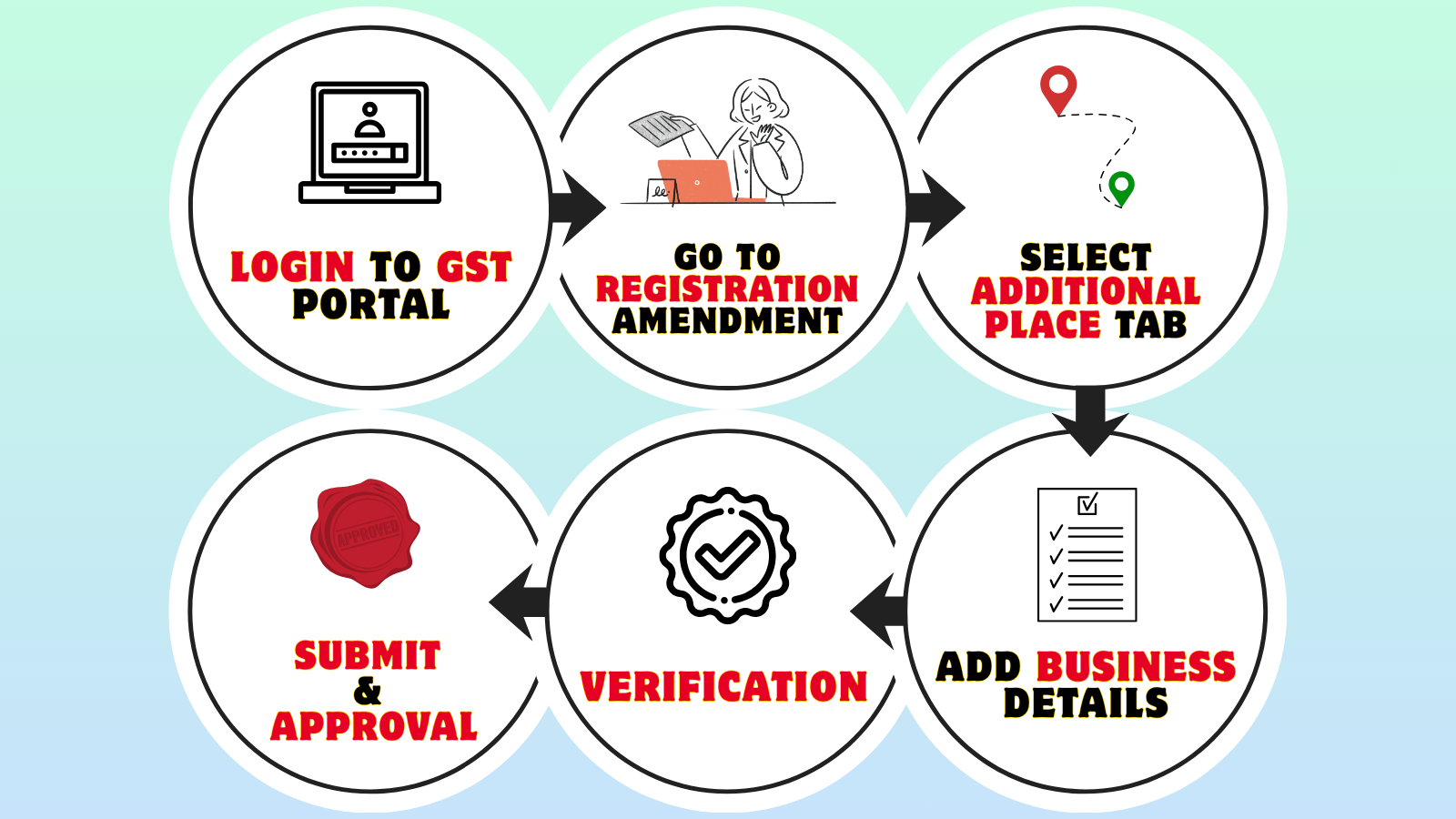
Here’s a simple step-by-step process to add an “additional place of business” on the GST portal:
- Log in to the GST Portal: Go to the GST official website and log in using your username and password.
- Go to the Registration Section: After logging in, click on the ‘Services’ tab. Then select ‘Registration’, and from the options, click on ‘Amendment of Registration – Core Fields’.
- Select the 'Additional Place of Business' Tab: You will see different tabs to make changes. Click on the tab called ‘Additional Place of Business’ to update or add your new business location.
-
View the Additional Place of Business Page: Clicking the 'Additional Place of Business' tab opens a new page where you can add or edit your locations. Click on the ‘Add New’ button and fill in all the required details. You also need to enter the reason for the amendment and the date of amendment. After entering the details, click on ‘Save.’
In the address section, you can either type the full address, PIN code, or latitude and longitude (for example: 32.48, 87.89, 24,7). When you enter at least 2 characters, the system will show auto-suggestions in the “Enter Address or Latitude, Longitude” search box on the top right corner of the map.
Note: If your business doesn’t have any Additional Place of Business added yet, first go to the ‘Principal Place of Business’ tab. Then, select ‘Yes’ under the option ‘Have Additional Place of Business’ to add a new one. You can also edit the existing address of an already added Additional Place of Business if needed.
- Complete the Verification Process: Click on the ‘Verification’ option. Tick the checkbox to confirm the details. Choose the name of the authorised signatory from the drop-down menu. Enter the place (city or location) from where you're applying. Then, sign the application digitally using either DSC (Digital Signature Certificate) or EVC (Electronic Verification Code).
-
Submit the Application and Wait for Approval: After you submit the application, a message saying ‘Successful submission’ will appear on your screen. Within 15 minutes, you will get an acknowledgement on your registered email and mobile number.
Since this is a core field change, it needs to be approved by a GST officer. Once they review it, you will receive an SMS and email saying whether your request is approved or rejected.
How to Remove or Delete an Additional Place of Business in GST?
If you wish to eliminate an Additional Place of Business (APOB) from your GST registration—whether it is due to the closure of a branch, the relocation of a warehouse, or the cessation of operations at that site—you may accomplish this online via the GST portal by submitting a core field amendment application.
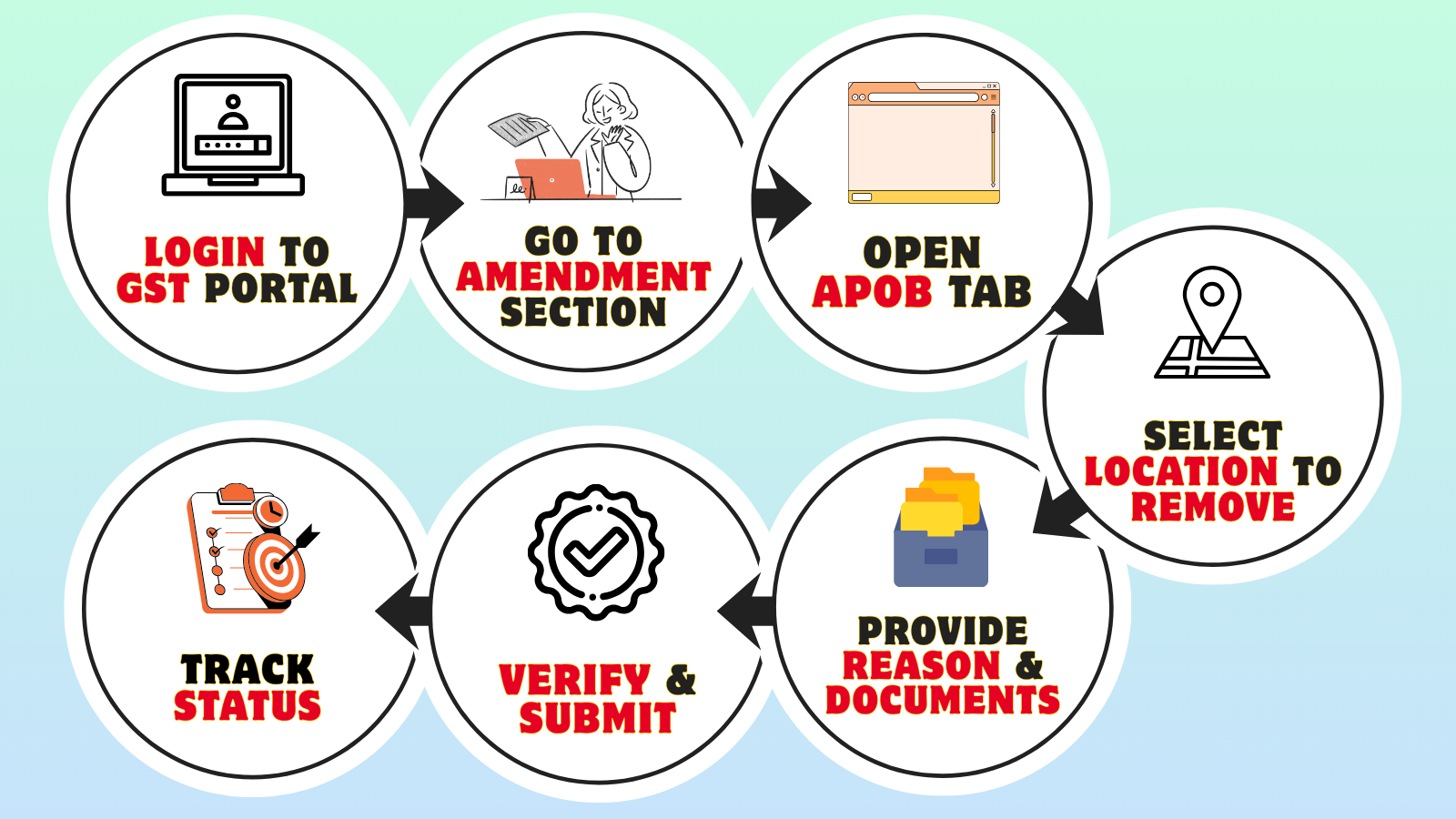
- Access the GST Portal: Visit the official GST portal at gst.gov.in and log in using your registered credentials (username and password). Complete OTP verification if prompted for two-factor authentication.
- Navigate to Amendment Section: From the dashboard, go to Services > Registration > Amendment of Registration – Core Fields. This section allows you to modify essential registration details including business locations.
- Select Additional Places of Business: Click on the "Additional Places of Business" tab to view all registered APOBs under your GSTIN. The system will display a complete list of all your current business locations beyond the principal place of business.
- Mark APOB for Deletion: From the displayed list, select the specific APOB you want to remove by clicking on the location entry. Choose the option to delete or remove that particular business location. Provide a valid reason for removal such as "Location closed," "Operations discontinued," or "Premises vacated."
-
Submit Supporting Documents: Upload required supporting documents to justify the APOB removal, such as:
- Lease termination agreement or notice
- NOC from property owner
- Closure declaration or discontinuation letter
- Final inventory transfer documentation (if applicable)
-
Verify and Submit Application: Review all changes carefully before final submission. Submit the amendment application using one of the following authentication methods:
- Digital Signature Certificate (DSC) – For companies and LLPs
- Electronic Verification Code (EVC) – OTP sent to registered mobile/email
- Track Application Status: After successful submission, you'll receive an Application Reference Number (ARN). Track your amendment request status under Services > Registration > Track Application Status by entering the ARN.
Fees for Registering APOB
• Government fees
Adding an Additional Place of Business (APOB) to your GST registration is completely free with no government charges. The GST department does not levy any fees for:
- Filing APOB amendment application through Form GST REG-14
- Adding multiple APOBs to existing GSTIN
- Updating or modifying APOB details
- Removing closed APOBs from registration
• Professional fees
While government fees are zero, businesses may incur costs if using professional services:
- CA/Tax consultant fees for documentation preparation: ₹2,000 - ₹5,000 per APOB
- Legal assistance for consent letters and NOCs: ₹500 - ₹3,000
- Virtual office or co-working space service fees: ₹2,000 - ₹5,000 per month (if using third-party address)
- Document procurement and notarization: ₹500 - ₹2,000
APOB Registration Timeline and Validity
• During Initial GST Registration:
When applying for new GST registration, businesses must declare all existing business locations including the principal place of business (PPOB) and all additional places of business (APOBs) in Form GST REG-01. The processing timeline follows standard GST registration approval:
- Application submission with all business locations declared
- Verification and processing: 4-8 working days for complete applications
- Physical verification may be conducted by GST authorities if required
- Total timeline: 10-15 working days from submission to approval
• Adding APOB After Initial Registration:
If you need to add an APOB after receiving your GSTIN, file an amendment application through Form GST REG-14 for core field changes:
- Immediate action required: Within 15 days of commencing operations at the new location, you must update your GST registration to include the APOB
- Amendment submission: Log in to GST portal and file core field amendment
- Document upload: Submit address proof, NOC, and consent letters
- Verification period: 7-15 working days for standard processing
- Physical verification: May extend timeline by 1-2 weeks if authorities conduct site inspection
- Total processing time: Typically 15-30 working days from amendment filing to approval
• Validity:
Once an APOB is registered and approved under your GSTIN, it remains valid indefinitely as long as:
- The business continues operating at that location
- The principal GST registration remains active
- You continue conducting taxable activities from that premises
- Annual GST returns and periodic filings are maintained
Unlike some business licenses, APOB registration does not require periodic renewal or revalidation. It continues automatically as part of your active GSTIN until you formally remove it or your GST registration is cancelled.
Additional Place of Business Certificate & Status Check
An APOB certificate is not a separate standalone document issued under GST. Instead, when you add an Additional Place of Business to your GST registration, it becomes part of your updated GST Registration Certificate reflecting all your business locations under one GSTIN.
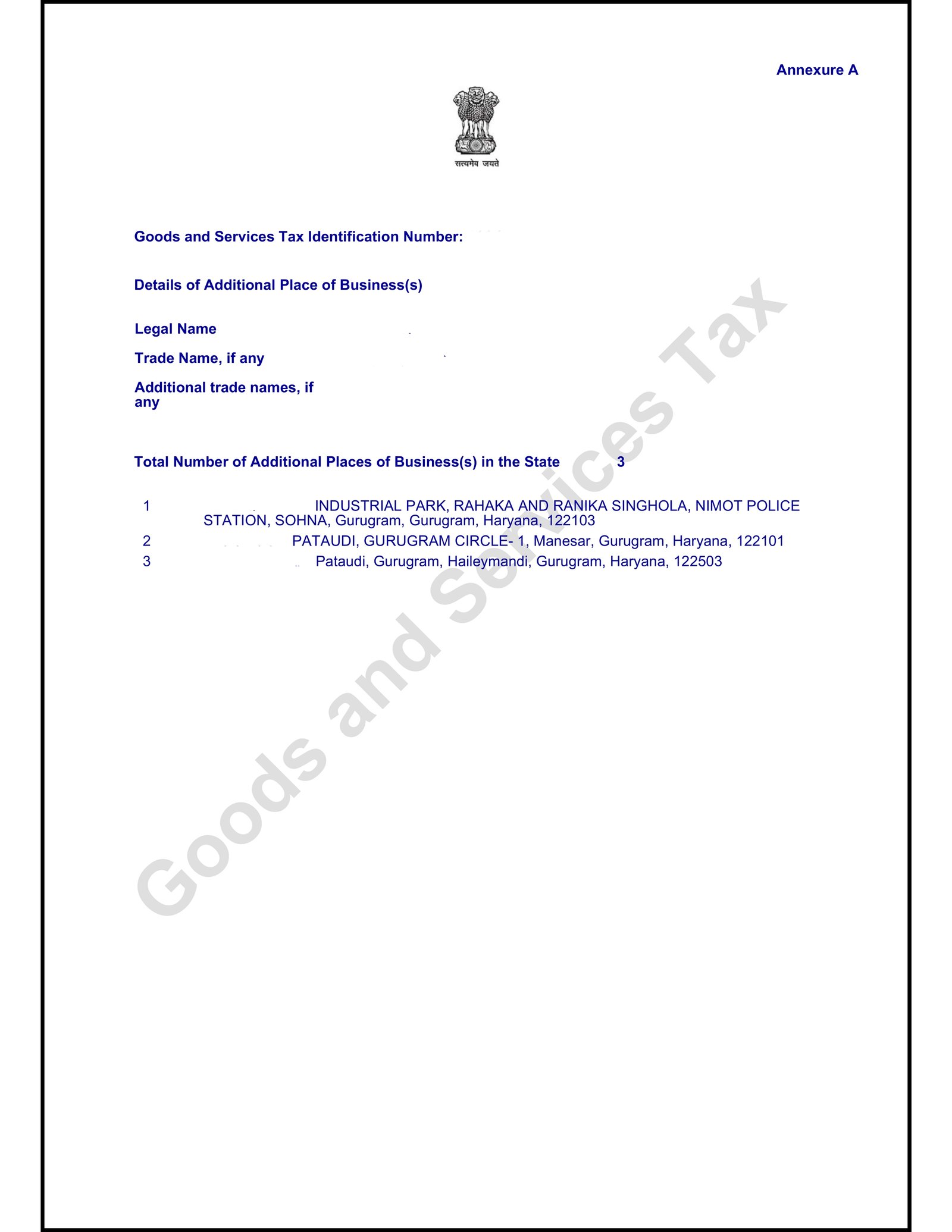
Details mentioned on the certificate
When you successfully register an APOB, the GST system updates your existing GST Registration Certificate to include the newly added business location. The updated certificate displays:
- GSTIN (Goods and Services Tax Identification Number) - remains the same for all locations within a state
- Principal Place of Business (PPOB) address
- All registered Additional Places of Business (APOBs) with complete addresses
- Legal name of the business entity
- Trade name (if applicable)
- Date of registration and effective date of APOB addition
- Type of business entity (Private Limited, LLP, Partnership, etc.)
How to download the certificate?
After your APOB amendment is approved by GST authorities, you can download the updated GST Registration Certificate:
- Log in to the GST portal at www.gst.gov.in
- Navigate to Services > User Services > View/Download Certificate
- Click on Download Certificate button
- Save the PDF file showing all registered business locations including newly added APOB
How to verify the status of the certificate?
One can verify your APOB registration through the GST portal's public search feature:
- Visit www.gst.gov.in
- Go to Search Taxpayer under Services
- Enter your GSTIN
- View complete registration details including PPOB and all registered APOBs
Need Help with APOB Registration?
Let our experts handle the GST amendment process for you. Get started today!
Frequently Asked Questions (FAQs)
What is the Additional Place of Business (APOB) in GST?
APOB refers to any business location other than the principal place of business where you conduct business activities like warehouses, branch offices, factories, godowns, or storage facilities.
Is APOB registration mandatory under GST?
Yes, it's mandatory to register all business locations (APOBs) within the same state under the same GSTIN. All premises where you store goods or provide services must be declared.
How many APOBs can I add in GST registration?
You can add up to 500 additional places of business in a single GST registration application.
Do I need a separate GSTIN for APOB in another state?
Yes, if your APOB is located in a different state, you must obtain a separate GSTIN for that state as GST registration is state-specific.
What documents are required to add APOB?
Required documents include proof of address (lease/ownership documents), NOC from property owner if rented, regulatory licenses for that location, and identity/address proof of business owner.
How do I add an APOB on the GST portal?
Log in to GST portal → Services → Registration → Amendment of Registration Core Fields → Click Additional Place of Business tab → Add New → Enter details and reason for amendment → Save.
What happens if I don't register my APOB?
Non-registration of APOB can result in penalties under Section 126 of GST Act, compliance issues, and rejection of input tax credit claims from that location.
Can I operate from multiple locations with one GSTIN?
Yes, within the same state, you can operate from multiple locations under one GSTIN by registering all locations as APOBs.
Do I need to maintain separate records for each APOB?
Yes, you must maintain separate transaction records for each APOB, though GST returns are filed consolidated under one GSTIN for all locations in the same state.
Can I add APOB after initial GST registration?
Yes, you can add APOB anytime after registration by filing an amendment application (core field amendment) on the GST portal.
What are the benefits of registering APOB?
Benefits include legal compliance, ability to claim input tax credit from all locations, smooth business operations, operational flexibility, and transparency with tax authorities.
Is physical verification required for APOB registration?
Physical verification may be conducted by GST officers during the approval process to verify the existence and operations at the additional location.